Our work
Systems we've built.
A large share of what we build ships under an agency partner's brand and is not ours to publish. What appears here is what we have permission to show — working automation canvases, with the client-identifying parts cropped out.
System gallery
The architecture, not the dashboard
Working canvases from builds we have permission to show. Client names, sub-accounts and workspaces are cropped out or the shot is not here at all — most of what we build ships under a partner's brand, and that is the arrangement they are paying for.
 n8nAI ChatAutomationIntegrations
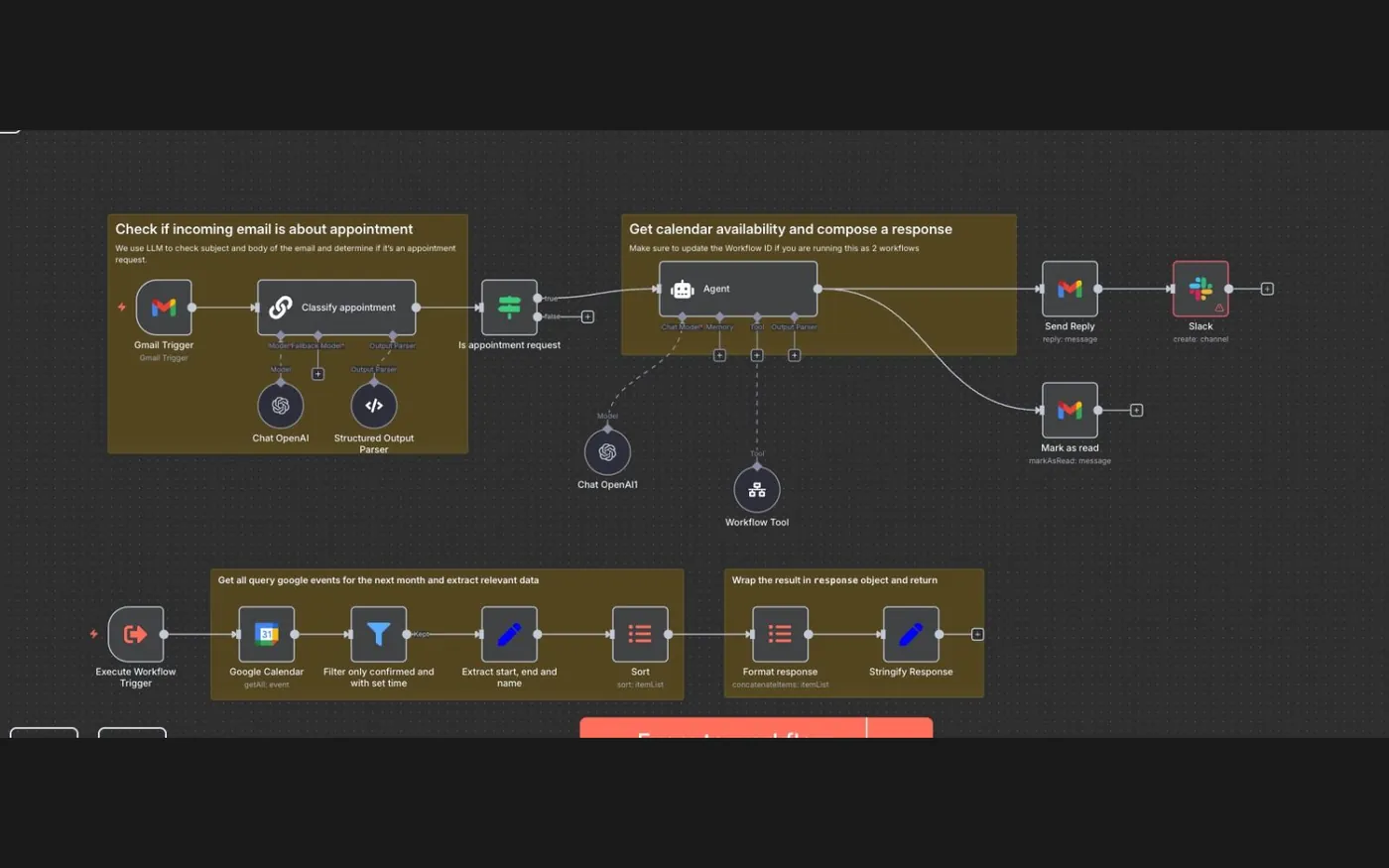
Inbound email triage into a booked appointment
A Gmail trigger passes every incoming message through an LLM classifier that decides whether it is an appointment request. If it is, an agent queries Google Calendar for the next month, filters to confirmed events, composes a reply with real availability, sends it, marks the thread read and posts to a Slack channel.
 n8nAutomationIntegrations
Invoice capture from a text, a voice note or a photo
Three parallel branches off one trigger, one per input type: voice transcription, image transcription and document parsing. All three converge on the same structured record, so the sender can send whatever they have to hand rather than being told which format to use.
 n8nAI ChatCRMIntegrations
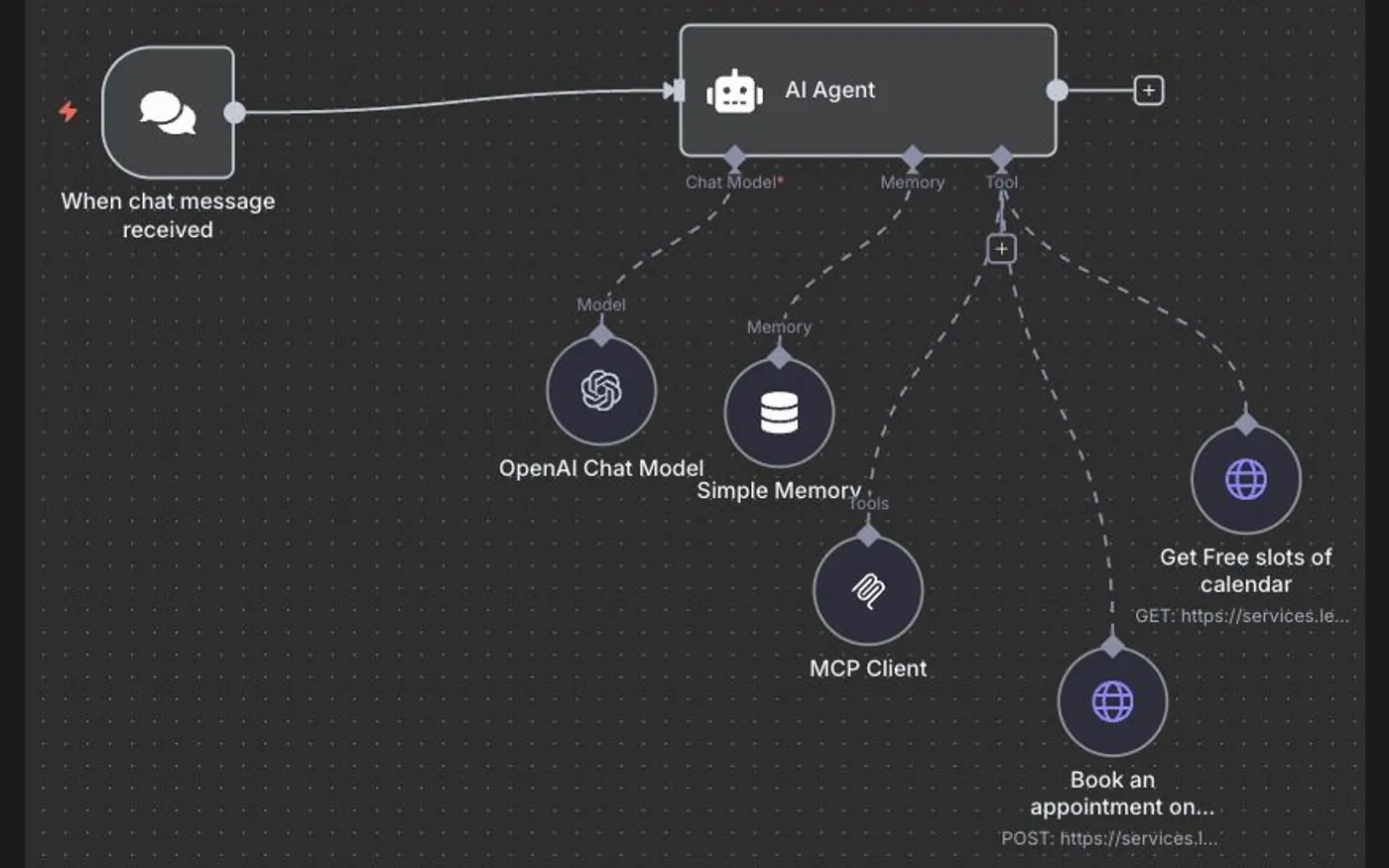
Chat agent that reads the calendar and books
A chat trigger drives an agent with a chat model, conversational memory and an MCP client. Two HTTP tools give it the only two capabilities it needs: fetch free slots, and post a booking. The agent cannot invent an appointment because booking is a tool call, not a sentence it generates.
 n8nCRMGoHighLevelIntegrations
Unstructured webhook into a clean CRM contact
A webhook lands whatever the upstream system sends. An agent with memory reads it, an information extractor pulls the fields that matter into a fixed shape, and the last node creates or updates the contact — so a change of upstream payload does not become a change of CRM schema.
 MakeAI ChatGoHighLevelIntegrations
An assistant behind the GoHighLevel chat widget
One webhook fans out across a router into per-conversation branches, each holding its own assistant thread so two visitors chatting at once never see each other’s context. Each branch calls the model, then returns the reply to the widget through a webhook response.
 MakeGoHighLevelCRMAI Chat
Lead capture to AI qualification
A custom webhook creates the contact in GoHighLevel first — so the lead exists in the CRM before anything else can fail — then a router sends it down one of two qualification paths, each ending in a model call and a webhook response.
 MakeAI VoiceCRMGoHighLevel
Call recording to a transcript on the contact record
A call recording is converted to a supported audio format, transcribed by a speech model, then matched to the right contact in GoHighLevel by search before the transcript is written back as a note. The search step is what stops a transcript landing on the wrong record.
 MakeCRMGoHighLevelAI Voice
Create-or-update, on both inbound and outbound calls
The scenario searches GoHighLevel before it writes anything. A router then takes the outbound path to update an existing contact, or the inbound path to create a new one — the small piece of logic that is the difference between a clean CRM and thousands of duplicates.
Every caption describes only what is visible on the canvas. None of them claims a result — outcomes publish in case studies, with the client's approval and a stated measurement method, or they do not publish.
Why this page is shorter than most agency portfolios
Two reasons, and neither is that we have not built much.
Most of it is not ours to show. A large share of what we build ships under an agency partner's brand, under an agreement that we do not identify their clients or claim the work publicly. That is the arrangement partners are paying for. A fulfilment partner who quietly builds a portfolio out of your client work is not one worth having.
We will not publish results we cannot evidence. A screenshot of a dashboard proves nothing — anyone can produce one. A percentage with no baseline and no measurement method is not a result, it is a claim. That is why the gallery above shows workflow canvases rather than revenue charts: a canvas is a thing you can read and judge, and it is the same thing we would walk you through on a call. Ourcase studies publish the system architecture in the same spirit, and leave the outcome sections empty until a client approves numbers we can stand behind.
What to look at instead
If you are trying to judge whether we can build what you need, the honest substitute is the architecture. Read a workflow automation or AI voice agent page and see whether the edge cases we describe match the ones you have hit. That tells you more about whether someone has done this work before than any portfolio grid.
Or ask on a call and we will screen-share a live system.
Want to see a live build?
A walkthrough of a working system on a call tells you more than a screenshot ever will.
Free · 30 minutes · no obligation